Calendar Picker

  UI/UX
Project Requirement
Design a mobile calendar picker for choosing the dates to stay at a hotel for a new hotel app. Think about who are the various types of users and the use-cases for who you are designing for.
My Contributions
I designed a full UI/UX project from scratch based on the requirement. I created a starting brief, personas, use case diagram, user flow diagram, user research (Guerrilla user research), competitive review, sketch, design (low&high fidelity wireframe), implement, edge cases and further steps. In order to view the hole detailed UI/UX documentation of the project click on the link down below.
Calendar Picker UI/UX Project
Understand: Understand requirements, Create user personas, Define users
Research: Analyse competitors, Research latest UX trends, Keep an eye on the guidelines
Sketch: Gather ideas , Draw sketches and wireframes , Evaluate and re-draw
Design: Design images Create prototypes, Define UX guidelines
Implement: Implement functionality, Build experience
Evaluate: Perform usability testing, Create audit reports, Identify improvements
First Steps:
Project Name: Room42Night (Room for tonight)

Project Description:
Company X wishes to develop and test a mobile calendar picker in order to enable people from all over the world to choose and book the dates to stay at a hotel for a new mobile app. This app will give the people the chance to book a room at whatever time & hotel they please in an easy and fast way.

Who is this for?
Everyone – This product gives any person the chance to inspect, the available dates in order to book a hotel room. However, everyone can check out dates and compare prices but only persons that are above 18 years old can book a room. This gives the possibility for minor people to do research for a vacation/trip/stay and for a major person to do research and also immediately book a room. This product will give everyone the possibility to plan their own stay under their own terms and conditions.

Feature List (Product requirements):
Easy onboarding, Login | Sign up, Destination (Where are you going?), Check-in | Check-out, Rooms, Adults | Children, Calendar picker grid, Available Hotels, Payment

Competitors & Product Inspiration:
Hotels.com app, Onenight app, Accorhotels, Hotelscombined, Hoteltonight, Travelocity  

Deliverables:
Wireframes for client approval, High fidelity prototype of the product, User Testing, Hallway testing, unmoderated remote testing, Usability Report, UI Assets for developers

Cost:
$4000 total with $93 p/hour for any additional work outside our brief, 50% payment required to begin work.

Timeline/Deadline:
10 August – UX research to be completed by X, 17 August – First wireframes delivered, 21 August – Feedback from wireframes due to X, 28 August – High Fidelity Prototype for review, 1 September – Feedback of prototype and begin final amends to UI, 4 September – User testing begins, Allow for 2 weeks of user testing o User testing completed & usability report presented

This would be how I see a UX project based on a specific requirement.
Starting brief:
Personas:
Personas:
Use case diagram:
Use case diagram:

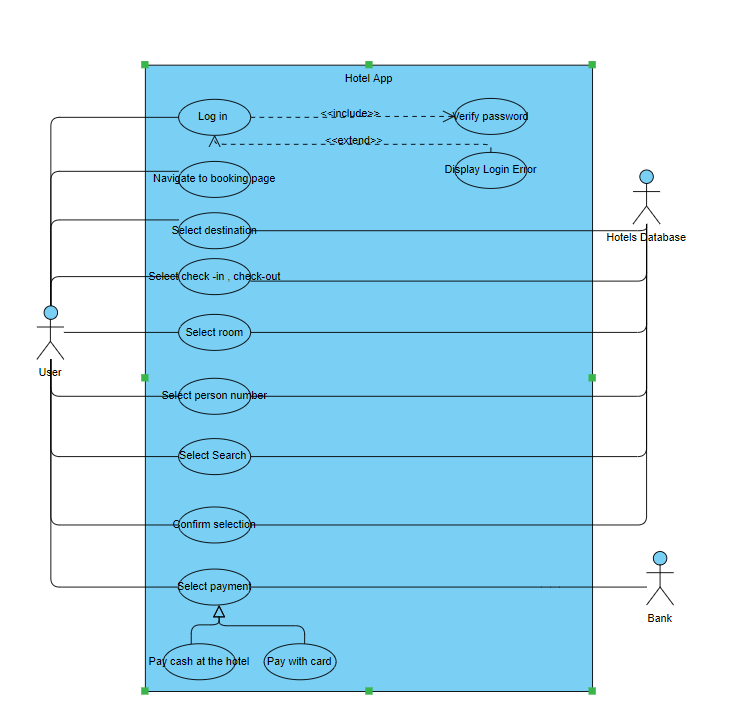
In the above use – case diagram I described how the user will perform tasks on the app. There are 3 actors, the “User” actor which is the primary actor and the secondary actors “Hotels Database” and “Bank”. The name of the system is “Hotel App”, after the user logs in, his password will be verified if all is alright he can proceed to the booking page if not he will get a login error message. After navigating to the booking page first he needs to select the destination, checkin/check-out, room, person number and search for the hotel with the corresponding room and when he is satisfied he can confirm the selection. All this use cases are associated with the user actor and the hotel database actor to get/set/update/delete the corresponding data. After all this is done the user must pay with card or cash at the hotel this also has an association with the bank actor that is responsible for the payment.
User flow diagram:
User flow diagram:

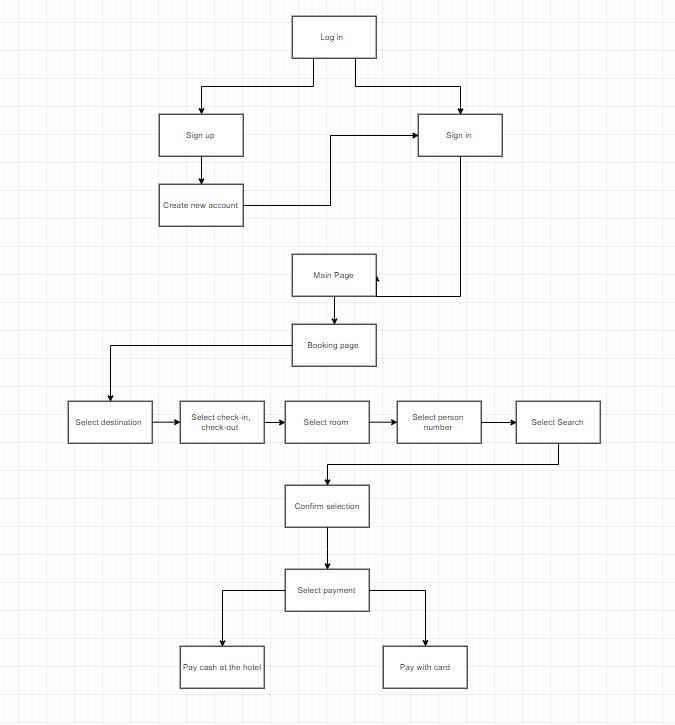
In the above user – flow diagram I described the process steps from the user entering the app to completing a room reservation.
One of the most used and effective way of doing user research for your product is Guerrilla user research. This method is great for UX research methods because they fit into a short timeline. Some of the most popular guerrilla UX research methods are: live intercepts, remote and unmoderated studies and using low fidelity prototypes. The following research tests are very important in order to give you another view/insight of how people see your application for the first time.  In the context of our calendar picker application I will apply this methods.

Live intercepts: You can go in populated places of your city and ask persons around you if they have a few minutes to conduct a user test. For the calendar picker the most important aspects would be how well does the user feel when using the application, is everything clear and intuitive, what would be some improvements. Usually it takes up to 5 people to form an 85% opinion about new thing to be done for the application. The most important aspect of this test if that the person that is testing the application need to speak each time their mind so that the opinion is in the most raw and sincere form.

Remote and unmoderated studies: This type or test is very effective because there are no geographical limitations the tests can be taken online, face to face meetings via Skype or conducting survey research. A great way for the calendar picker to be tested by all the users would be to have a polls after making a booking in which the users rates the way he felt using the application and what would be some improvements.

Low fidelity prototypes: You can create low fidelity prototypes using live application/sites, digitally linked wireframes or static images or a paper prototype. After completing the low fidelity prototype you run a usability test and see how people perform the tasks of the application that you implemented. For our calendar picker it would be recommended to let the users test the low and high fidelity prototypes in order to understand and feel more familiar with the application.
User Research:
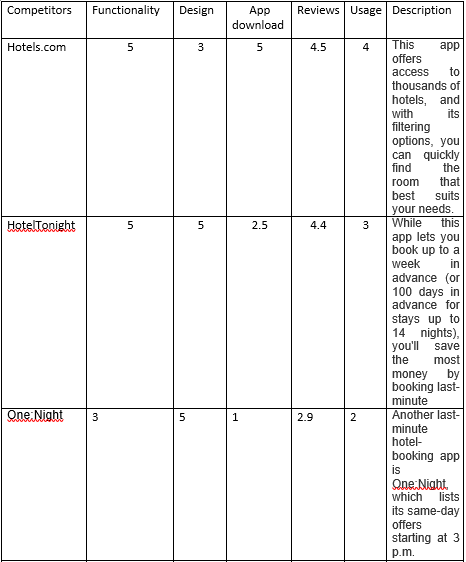
After analysing the possible competitors, their statistics and popularity I created the following diagram describing them. The rates are from 1-5.
Competitive Review:
Step 1:
In this phase of the project I started to think of 4 most important topics before starting to sketch, these are: Our goals for the page, Users goals for the page, The questions the user is going to need answers to in order to accomplish the goal, The emotions we want to evoke

Step 2:
After that I started to sketch using consistent symbols to represent different content types.

Step 3:
Look for that common goal that you and the user share.

Step 4:
Sketch out the remaining content.

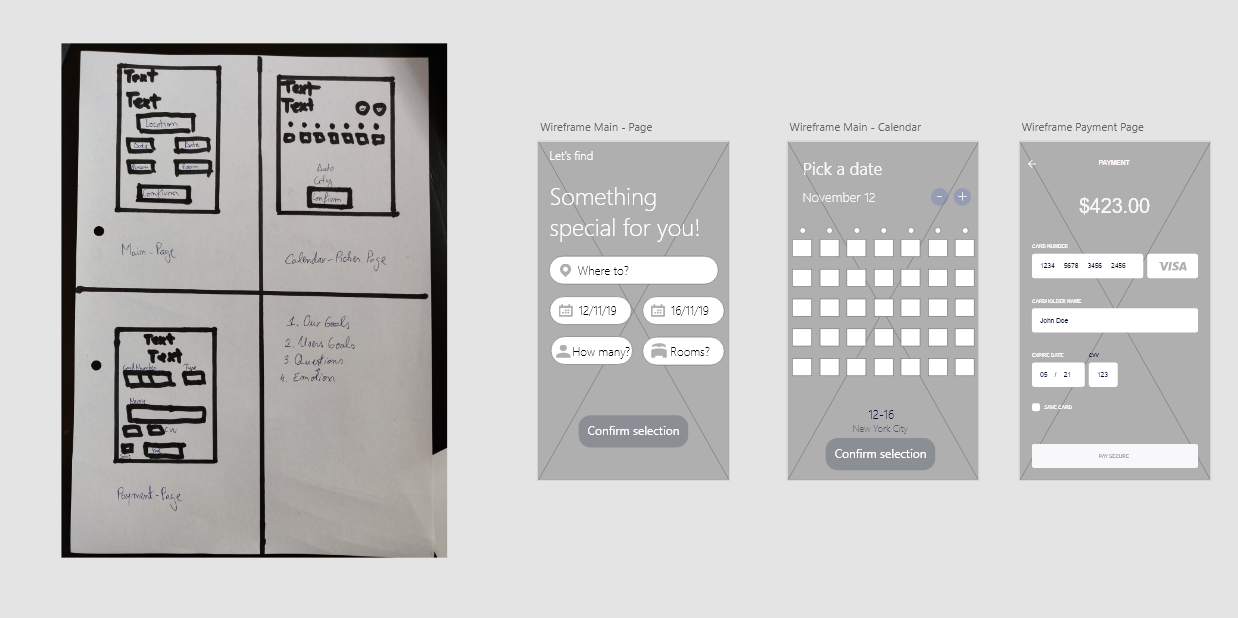
After all this steps are compete I used Adobe XD to create the low fidelity wireframe. All the files that I created with Adobe XD are attached to the folder Wireframes for a better visualization. It can also be seen in the Low – Fidelity figure down below.
Sketch & Design & Implement:

Low fidelity wireframe

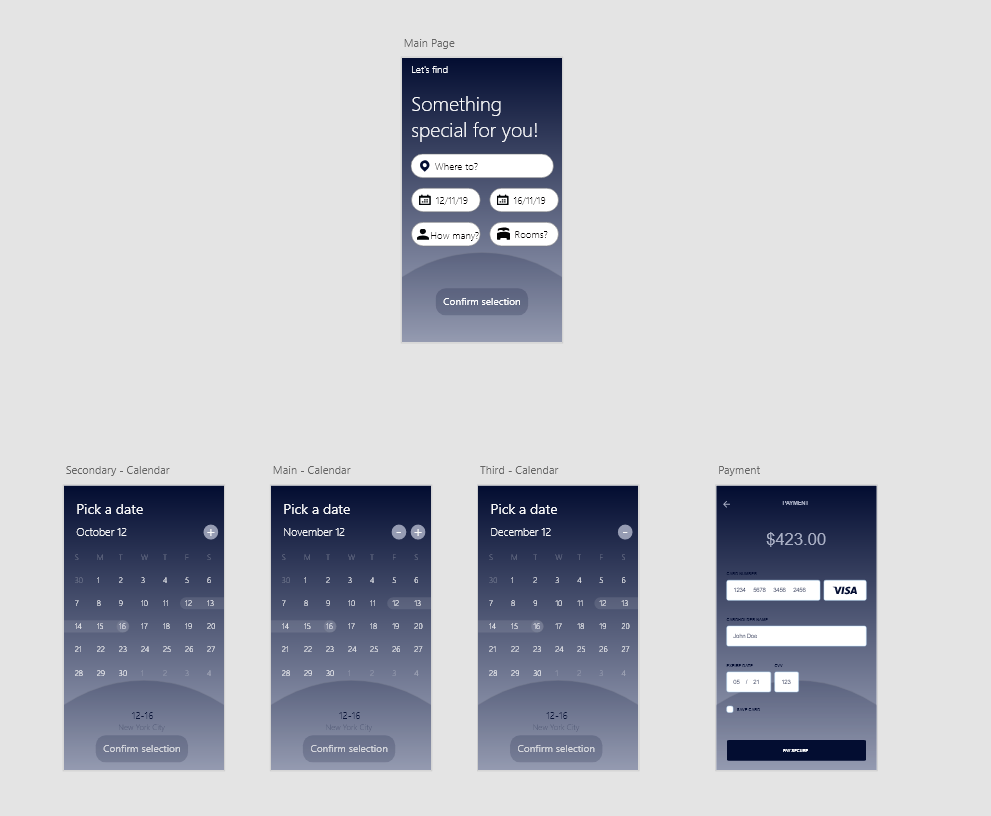
In the following I also designed the high fidelity wireframe using Adobe XD, it incorporates the backbone structure of the low fidelity wireframe plus the design, colour and style. It has a closer look on how the app would appear in the final version of the software. This wireframe also contains prototyping in order to get a better look and feel of how to book a room at a hotel using a calendar picker. We have the main page in which the user can choose the location where he want to book a room, check-in, check-out, rooms and how many persons. When clicking on the check – in / check – out the app takes us to the calendar picker page where we can select the dates to book for our stay, navigate from one month to another using the - , + buttons and finally confirming the selection. By clicking confirm the selection the user is brought back to the main-page where he can confirm all the remaining data and he will be sent to the payment – page. This page I implemented using already designed wire – kits. The user can click the button pay or go back to the main page if he changed his mind using the arrow label.
High fidelity wireframe:

High fidelity wireframe

Edge cases:

If the app has a name parser included, in other words it asks you for your full name and then selects in the background which would be the firstname and lastname this could result in an edge cases because a person could have a firstname Rose and lastname Mary and the algorithm could easily switch these two because names are a subjective matter that can’t be predicted. To avoid this case simply create input fields for both types of name and let the user fill it out.

When selecting a date for booking a room at a hotel, this could cause an edge case if the user selects a date in the past without noticing it and then booking it. To avoid this case the app should show date that start from the present day in the future.

Calendar pickers for booking a room in a hotel usually have a scrolling date picker on mobile devices, this can be annoying for the user if the picker contains many dates because scrolling is slow and unproductive. An alternative for these kind of situations would be to allow users to type the date directly.

Dropdowns for month, day and year increases interaction cost by adding clicks and scrolling. A good alternative would be to type the data, it’s a basic option but the most efficient one especially if the date is in the further or the past.

Special characters should not be required to be entered by the user to format dates. Whatever format users chose for entering the date (dashes, spaces, slashes etc.) the input should be recognized.

Preserve user’s work, if the same date information is required in a separate part of the app, then don’t make users enter that date twice.

Next steps:

Perform multiple usability test on all the types of personas in order to from a better opinion on the quality of the software, before the calendar picker will be put into production.
Evaluate: